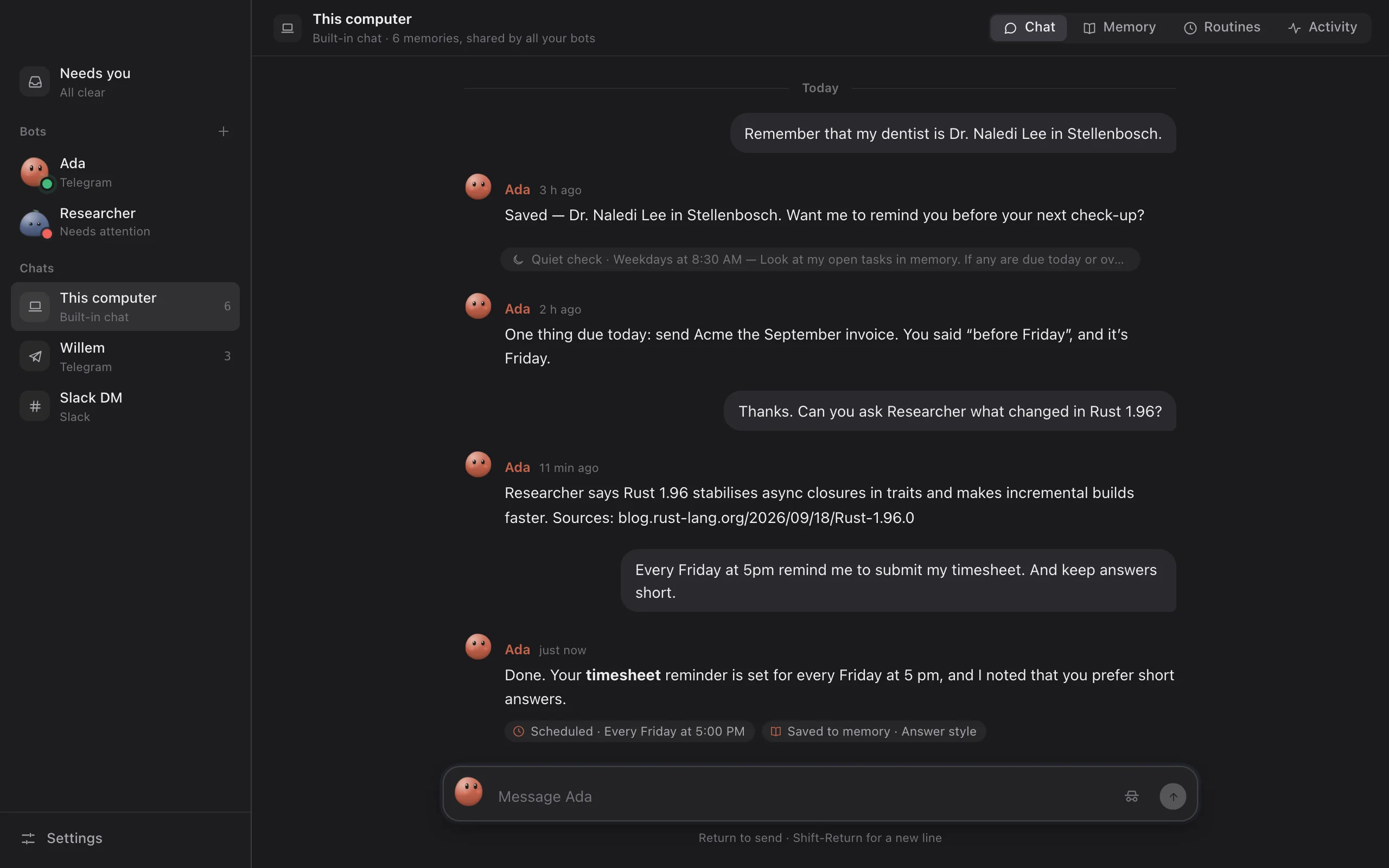
Message it in Telegram, Slack, Discord or on your desktop. It remembers you, handles email, calendar and reminders, works on a schedule while you’re away, and asks before anything that matters.
It runs on the Claude, ChatGPT or Grok plan you already pay for. No Mimir account, no Mimir server.
Windows asks once before it runs the installer: More info, then Run anyway. Why
What Mimir is
An app that runs AI assistants for you; we call them bots. You talk to them in plain words and they act with the tools you give them.
The desktop app. The same bots answer in Telegram, Slack and Discord, and keep working with the window closed.
Install the appOn Mac, Windows, Linux or your own server. No account to make.
Sign in with the AI you haveClaude, ChatGPT or Grok on the plan you already pay for. Or an API key, or a local model.
Message your botIn the app, or from your phone through Telegram, Slack or Discord.
Things you can ask
Remind me in two hours to call mum.A message at 16:30, then the reminder is gone.
Every weekday at 7:30, brief me on tech news in three bullets.A routine: there each morning, in Telegram.
Any emails from Sam about the invoice? Draft a yes.It searches your inbox and leaves a reply in your Drafts.
When am I free on Thursday?It reads your calendar.
Watch example.com/pricing and tell me if it changes.A quiet check that only speaks up when it does.
No, shorter. Three bullets.It offers to remember that; accept, and all your bots follow it.
Mimir isn’t an AI model or a cloud service: it uses your AI, and what your bots know about you is one file on your computer.
A memory you can read, correct and undo
Everything your bots know about you is a list like this one, and each line says where it came from.
Each suggestion brings its reason. Push back on a reply twice and you’re offered a rule for it.
2 suggested changes From recent conversations.
Forget
Talk abstractSubmit the meetup talk abstract by 30 September.You said it went in on the 28th.
Remember
Weekly review When writing the weekly review, keep it under 150 words.You asked for a shorter one twice.
Nothing waiting. Your bots will suggest more after the next quiet half hour.
Every memory says who wrote it: you, a bot, a tidy-up or an import. Mimir records that itself, not the model.
News format
When giving tech news, always use three bullet points with links.
tidy-up, approved by you1 h agorecalled 3×#7
A correction keeps what it replaced. Erase removes both, for good.
Coffee
Switched to black coffee, no milk.
you said5 h agocorrects #1#3
earlier version
Flat white with oat milk, one in the morning. you said · 12 Sep
Saved after reading a web page? It stays unconfirmed until you say it looks right, so a planted instruction never reads like something you said.
Partner
Sam. Anniversary is 14 March.
Ada, after reading calendar.example.comyesterdayafter reading outside content#6
A pinned memory is always in front of your bots, however much else there is. Incognito chats can’t see any of it, and keep nothing.
Dentist pinned
Dr. Naledi Lee in Stellenbosch; usually books Tuesday mornings.
you said, in Telegram3 h agorecalled 4×#4
Talk to it where you already talk
Telegram, Slack, Discord or the desktop app. In groups it only answers when @-mentioned, and /stop cuts a reply off. Send a voice note, or interrupt mid-reply and it changes course.
Ada bot# home Thread# generalThis computer 6 memories, shared by all your bots
YYou
@Ada Every Friday at 5 pm remind me to submit my timesheet. And keep answers short.
@You Every Friday at 5 pm remind me…Ada app
Done. Your timesheet reminder is set for every Friday at 5 pm, and I’ve noted that you prefer short answers.
Scheduled · Every Friday at 5:00 PMSaved to memory · Answer style
The same bot and the same memory, in four places.
Routines, in plain words
Say “every weekday at 7:30, brief me on tech news” and it’s scheduled. Quiet checks only message you when something needs you. Routines can also start from a meeting, a matching email or a webhook.
Friday
00
03
06
09
12
15
18
21
24
Ada
Page watcher
Weekly reviewer
AdaMorning brief: three headlines, one line each, with links.
Page watcherstatus.example.com has returned 502 since 11:52. The quiet check spoke up.
Weekly reviewerYour week: the Acme invoice went out, Lisbon is booked, the contract review is still open.
AdaTimesheet. It’s Friday.
AdaDaily digest: 9 quiet checks ran; one needed you.
Each result is sent right away, saved for your daily digest, or just logged, with the tokens it used.
Unchanged costs nothing
A quiet check on a page, a feed or your inbox doesn’t wake the AI until something actually changed.
Daily caps
Set a token limit for a routine, a bot, or all of them. Past it, routines pause and ask.
A rehearsal first
Try a new routine once without it sending or changing anything: it says what it would have done.
Hands back at a login
At a sign-in, a code or a payment, the bot stops and sends you a link to the live screen. You do that part; it carries on.
Your inbox, your calendar and the web
Connect what you want them to work with. Each is optional.
Email
Bots search and read your mail, write drafts, and send when you approve. Nothing is marked read, moved or deleted.
Calendar
They read it from its private link, and add events when you approve.
Web search
Through a free Brave Search key or your own SearXNG, then they read the pages that matter.
Files
Each chat keeps a small folder of notes, lists and drafts too long for a memory.
Gmail, iCloud, Fastmail and any mail with an app password; Google, iCloud and Outlook calendars. How to set each one up.
Skills, from a library or from what worked
A skill is the steps for one kind of task. Bots read them only when a task fits, or when you type its name.
Morning briefing
Today’s calendar, open tasks and what you follow, in ten lines. Schedule it in one click.
Inbox triage
What needs you, what’s FYI, what’s noise, with short replies left as drafts.
Price watch
Tells you when something drops below your price or is back in stock.
Weekly review
Done, slipped, and next week’s priorities, from your memory and chats.
Fourteen in the library, plain text, none added until you press Add. Or say “save that as a skill” after a task that went well. All of them.
Several bots, one memory
Each has its own job, AI account and tools, and any of them can hand a task to another.
AdaYou’re my personal assistant. Keep answers short.Telegram, desktopClaude · your plan
ResearcherRead the sources before answering, and always link what you used.SlackChatGPT · your plan
Morning brieferFive bullets at most, most important first.Telegramqwen3 · on this computer
Page watcherCompare with last time, and only report real changes.DiscordOpenRouter · your key
Weekly reviewerBe honest and specific, and keep it short.DesktopClaude · your plan
Ask Researcher what the Acme contract says about late payment.
Ada → Researcher · on Researcher’s ChatGPT plan, with its own tools
Ada Researcher read acme-contract.pdf: 2% a month on anything unpaid after 30 days (section 7.2).
It asks before it acts
Every tool is allowed, asks first, or is off. After a bot reads a web page or an email, anything that changes data asks first. No answer means no.
Ada wants to open a web page
calendar.example.com/anniversary
You’ve allowed this site twice before.
Every “always” becomes a rule you can see and remove.
Search memoryAllow
Remember somethingAllow
Forget a memoryAsk
Delete a routineAsk
Open a page in the browser github.com: alwaysAsk
Send an email who it’s to first, then the whole textAsk every time
Make a new bot its whole role on the cardAsk every time
Type a saved login never becomes “always”Ask every time
Questions people ask
What does it cost?
Mimir is free and open source. Your bots run on the AI plan you already have (Claude, ChatGPT or Grok). With an API key you pay that service for what you use; a model on your own computer is free.
Do I need an API key?
No. For Claude or ChatGPT you sign in once to their official command-line app (claude or codex), and Mimir uses that login.
Where does my data go?
Memories, chats and settings are one file on your computer or server. What a reply needs goes to the AI you chose. There are no Mimir servers.
Is it safe to connect my email?
Reading changes nothing. Every email it would send asks you first, with the whole text, and sending never becomes “always”. It uses an app password you can revoke.
Does my computer have to stay on?
Bots work while the app runs in the menu bar or tray. For bots that work while your laptop sleeps, run Mimir on a server.
How is this different from the Claude or ChatGPT app?
It uses them, and adds bots in your messaging apps, routines that run while you’re away, one memory you can read line by line, and approvals for every action that matters.
 Mimir
Mimir